
Pinterest Marketing for Etsy Sellers: A Practical 2026 Guide
Pinterest marketing for Etsy sellers works best when every Pin answers one buyer question, uses the same search intent as its destination page and gives the click a clear next step. Start with five useful Pin angles, publish them to tightly related boards and measure saves, Pin clicks and outbound clicks before scaling.
Key takeaways
- Pinterest and Etsy keywords serve different moments: Pinterest often reaches people while they are planning; Etsy reaches them closer to purchase.
- One product can support seven genuinely different Pins without repeating the same image and caption.
- Place keywords in the title, description, board context, image text and matching page instead of stuffing them into one field.
- A strong Pin states the problem and outcome clearly enough to understand on a phone.
- A focused 30-minute workflow is better than irregular bursts of rushed, near-duplicate Pins.
This guide turns five common seller problems into one repeatable workflow. It does not promise instant traffic or sales. Pinterest distribution takes testing, and a Pin still needs a useful product, listing or article behind it. The goal is to make every impression more relevant and every click less confusing.
Five Pinterest SEO fixes when Etsy views are stuck
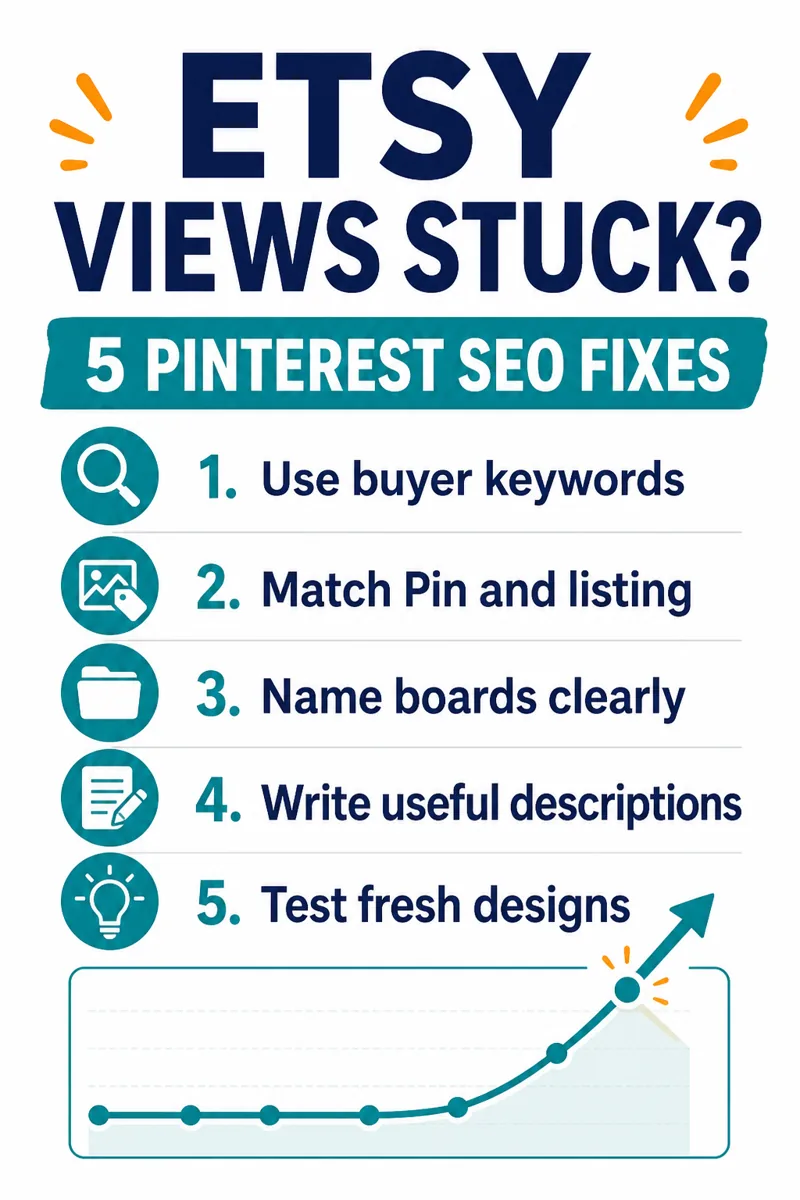
If your Pins receive little distribution, the answer is not automatically “post more.” First check whether Pinterest can understand the topic and whether the Pin keeps the promise made by its destination. Pinterest's own business guidance recommends relevant keywords in Pin titles, descriptions, board titles, board descriptions and the website URL. It also recommends adding a title, description and link, then saving the content to a relevant board.
- Use buyer-search language. Describe the result or use case a shopper wants. A printable meal planner might target “weekly meal planner printable” or “meal planning checklist,” not an internal collection name.
- Match the Pin and destination. If the Pin promises a sizing guide, link to a sizing guide or the exact listing section that answers it. Do not send that click to an unrelated homepage.
- Name boards clearly. “Printable Wedding Planning” gives Pinterest more context than “My Favorites.” The board should represent a real topic, not just the seller.
- Write useful descriptions. Explain what the person will learn, download or buy. Include related phrases naturally, then give one clear action.
- Test fresh creative. Change the information structure, not only the color. Try a checklist, comparison, annotated example, mistake graphic and product demonstration.
Imagine an Etsy seller offering a wedding budget spreadsheet. One Pin can focus on “wedding budget categories,” another on “hidden wedding expenses,” and a third on “wedding budget spreadsheet template.” All three can link to the same product only if the listing clearly supports each promise.
Turn one digital product into seven useful Pin ideas
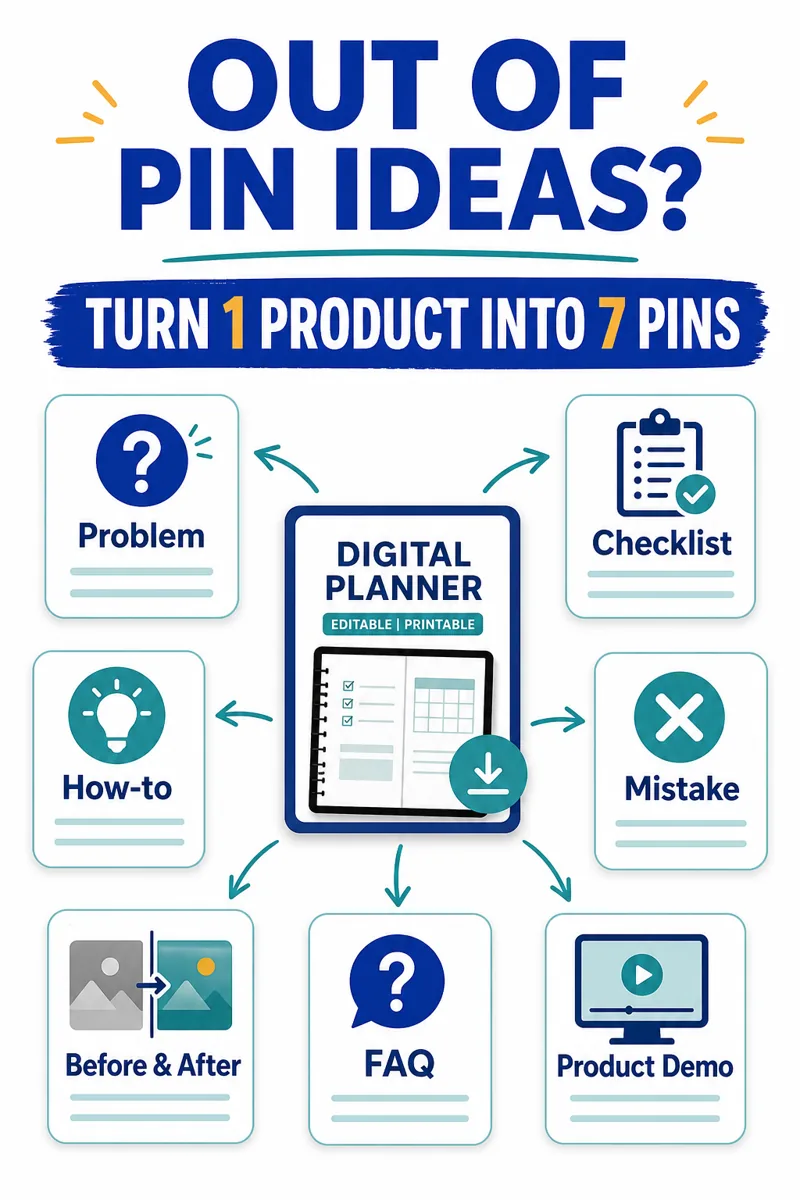
A product is not one content idea. It is a set of problems, decisions, instructions and outcomes. Use these seven angles to build a useful content library around one Etsy listing or digital download:
- Problem: show the frustration that sends the buyer searching.
- Checklist: give the buyer a short process they can save and use.
- How-to: teach one practical step from the product's wider workflow.
- Mistake: show what commonly goes wrong and the safer alternative.
- Before and after: compare an unclear process with an organized one without inventing customer results.
- FAQ: answer the question that delays purchase, such as compatibility, file type or printing.
- Product demonstration: show the actual pages, tabs, fields or workflow instead of a decorative mockup alone.
A digital product seller with an editable content planner could build seven structurally different Pins in one session. The problem Pin shows a scattered weekly plan. The checklist Pin lists the five inputs needed before planning. The demonstration Pin shows the actual calendar and status fields. They promote the same product, but each earns attention for a different reason.
The rule is simple: one Pin, one question, one next step. If the visual tries to explain every feature, it becomes unreadable. If every Pin says “buy now,” the board becomes a catalogue rather than a helpful discovery resource.
Where Pinterest keywords should go
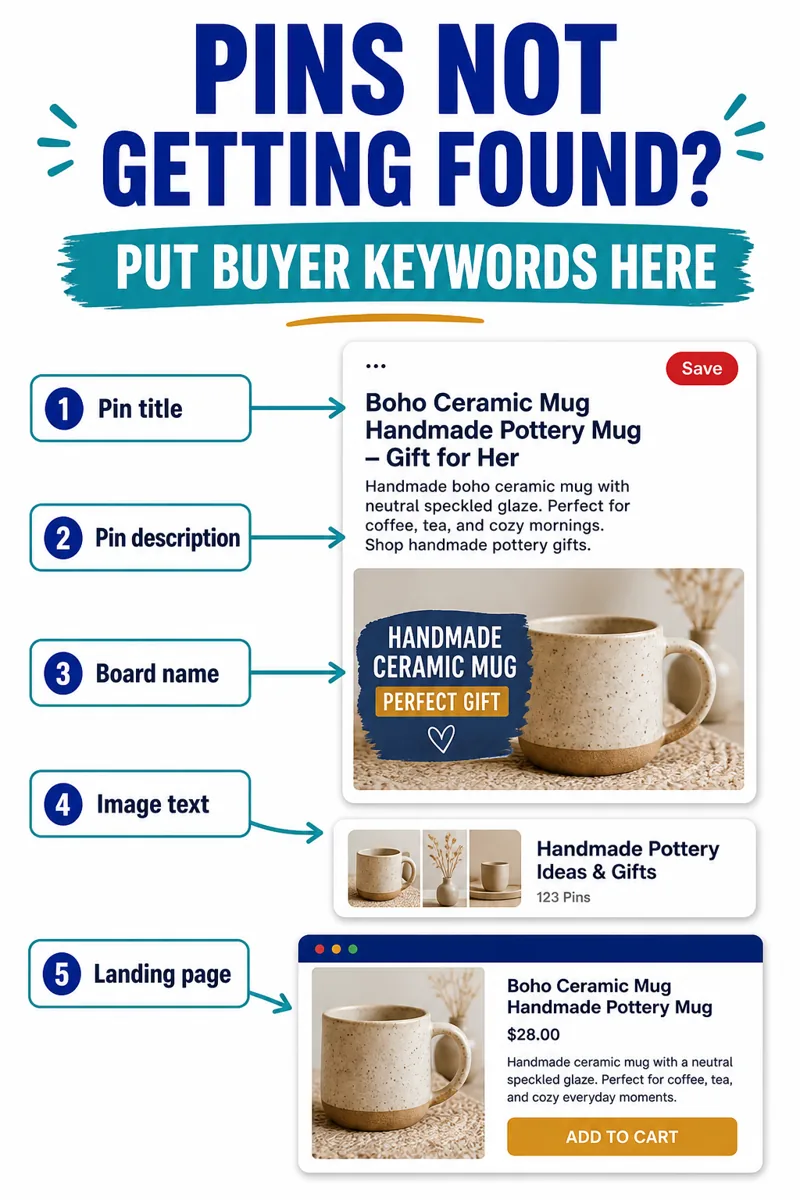
Keywords work as a relevance chain. Pinterest reads the Pin and its surrounding context, while the visitor judges whether the landing page answers the same need. Use the primary phrase in five places when it fits naturally:
| Location | What it should do | Example |
|---|---|---|
| Pin title | State the exact topic early | Pinterest SEO for Etsy Sellers |
| Pin description | Add context and a next step | Use buyer keywords in titles, boards and matching pages |
| Board name | Group the Pin with one clear subject | Pinterest Marketing for Etsy Sellers |
| Image text | Make the problem and outcome visible | Etsy Views Stuck? Try These 5 SEO Fixes |
| Destination page | Deliver the promised answer | A guide with the same Pinterest SEO topic |
Do not paste a list of twenty phrases into the description. Choose one primary search phrase and two or three close supporting terms. Read the sentence aloud. If it sounds like a list created for an algorithm rather than a person, rewrite it.
Pinterest search suggestions can help you discover how people phrase topics on the platform. Start with the product, then note planning, use-case and audience modifiers. A seller of nursery prints might test “nursery wall art,” “boho nursery decor” and “gender neutral nursery ideas,” then choose the phrase that accurately matches the product and page.
Four Pin design mistakes that lose Etsy clicks
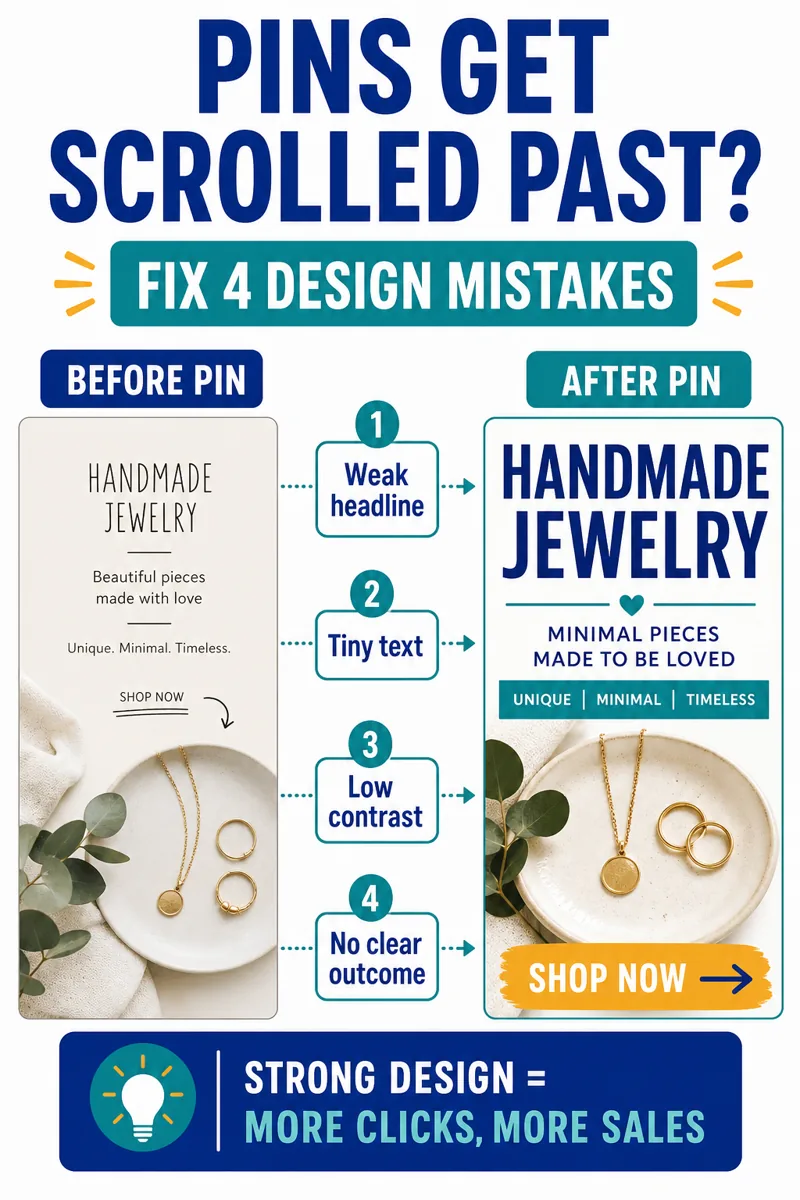
Pinterest recommends a vertical 2:3 canvas, commonly 1000 by 1500 pixels, because most people browse on mobile. Size alone does not make a Pin clear. Fix these four problems before publishing:
- Weak headline: a category name gives no reason to stop. State a useful problem, decision or outcome.
- Tiny text: copy that looks acceptable on a laptop can disappear in the feed. Test the design at phone width.
- Low contrast: use a solid text panel, darker overlay or clean negative space over detailed photography.
- No clear outcome: show what changes after the click: choose a keyword, organize a process, compare options or see the product in use.
Do not hide the real product behind a decorative design. If the Pin sells a spreadsheet, show the working spreadsheet. If it teaches Pinterest keywords, show an annotated Pin example. Problem and outcome should lead; branding should support them.
Also avoid near-duplicate Pins. Swapping blue for green while keeping the same layout, headline position and icons does not create a genuinely fresh asset. Change the composition: checklist, split comparison, diagram, product close-up, workflow or annotated screenshot.
A 30-minute Pinterest plan for busy Etsy sellers
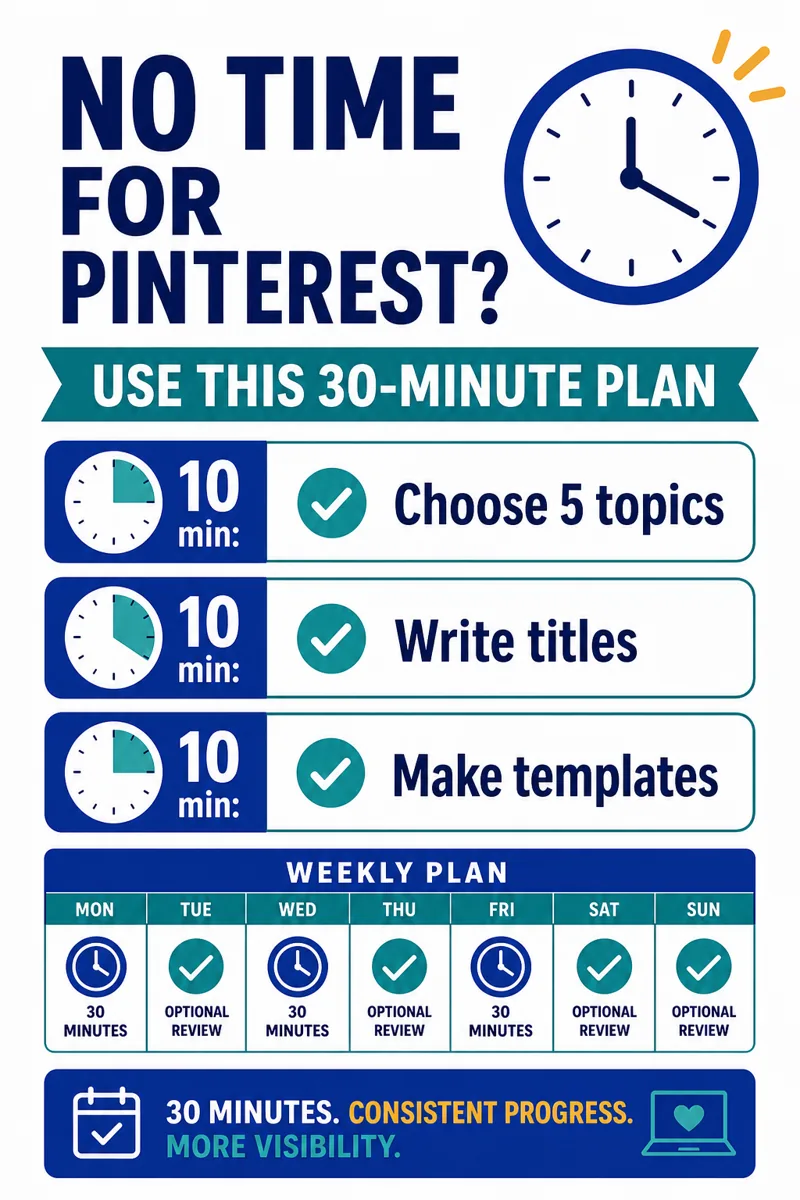
Use one focused planning session before opening a design tool:
- First 10 minutes: choose five topics. Start with one product and list five buyer questions, objections or tasks around it.
- Next 10 minutes: write five titles. Put the plain search phrase early and state a specific outcome. Remove claims you cannot prove.
- Final 10 minutes: assign five visual structures. Choose a checklist, before-and-after, diagram, product demonstration and short workflow.
This is a planning method, not a promise that five finished Pins always take thirty minutes. Good product photography, accurate examples and careful quality checks can require more time. The benefit is that design work starts with decisions already made.
After publishing, record the title, board, destination and date. Review impressions, saves, Pin clicks and outbound clicks after enough time has passed for distribution. If a Pin gets impressions but few clicks, test the headline and visible outcome. If it gets clicks but the page does not convert, fix the landing-page match before increasing volume.
Link every Pin to the most relevant next step
A destination link is not a box to fill. It is the second half of the Pin. A product demonstration should link to that exact product page. A checklist Pin should link to a checklist, guide or article that completes the task. A comparison Pin should link to a page where the comparison is visible.
If the matching page does not exist, publish it first or leave the Pin unpublished until it does. Sending every topic to the homepage may create clicks, but it also creates confusion. Pinterest's creator guidance describes the link as a clear next step; make that step specific.
One comprehensive guide can support several Pins when each Pin links to the exact matching section. Separate articles make sense when the search intent is distinct enough to deserve a full answer. This builds topic depth without flooding the site with thin, repetitive pages.
Frequently asked questions
Is Pinterest useful for Etsy sellers?
It can be a useful additional discovery channel because people use Pinterest to plan products, gifts, projects and purchases. Results depend on product-market fit, search relevance, creative quality, destination-page quality and consistency.
Where should Pinterest keywords go?
Use the main phrase naturally in the Pin title, description, board context, visible image text and matching destination page. The same topic should be obvious across the entire click path.
How many Pins can I create from one digital product?
Start with seven: problem, checklist, how-to, mistake, before-and-after, FAQ and product demonstration. Each should have a different message and visual structure.
What size should a Pinterest Pin be?
Pinterest recommends a vertical 2:3 aspect ratio, often 1000 by 1500 pixels. Keep important text large, high-contrast and inside safe margins.
Your next step
Pick one Etsy listing or digital product. Write five buyer questions, match each question to a useful page and create five structurally different Pins. Review the results before repeating the batch.